EXPLORE / THE PANEL LANGUAGE
Read the node.
Notice the group.
A repeated visual language lets you scan a whole wall without reading every panel word by word.
01 / ORIENTATION
Identity, context, state.
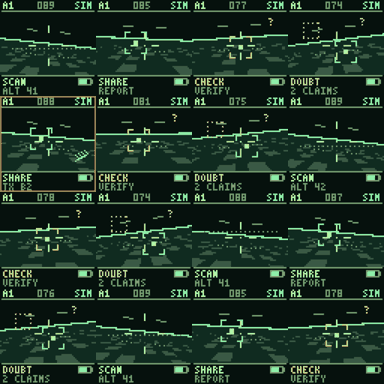
The node identifier locates a panel in the reference A1–D4 grid. A SIM marker identifies simulated content. The central state word gives the quickest reading; smaller indicators provide context.
IR, NV and CAM in this visualisation refer to simulated sensor modes. Their presence does not mean those cameras are fitted to a panel. A battery graphic is not a measurement of the wall’s 5 V supply.
02 / A SMALL VOCABULARY
What the states tell you.
- READY
- Waiting for a run to start.
- SCAN
- Searching or observing within the scenario.
- SHARE
- Passing a report to the group.
- CHECK
- Examining a report before acting.
- DOUBT
- Showing uncertainty or a questionable claim.
- HOLD
- Waiting or abstaining from a decision.
A state is a display cue, not a benchmark condition or a success rate. Read it alongside the policy decision and the run record.
03 / THE WHOLE WALL
Watch transitions.
Look for clusters, outliers and changes over time. One uncertain node and a wall full of uncertainty are different patterns, but neither explains the cause on its own.
Panel borders currently show communication cues. The optional ARGB channel grid is a separate extension for making those exchanges visible between nodes.